SupplyPro vs. SupplyPro GM: What’s Actually Different?

If you’ve been using SupplyPro for years, you may be wondering where SupplyPro GM fits into the workflows your team already knows and relies on.fits into the workflows your team already knows and relies on.
The good news is that you’re not starting over. SupplyPro GM builds on the familiar SupplyPro foundation, extending the workflow beyond the Builder-issued order so Suppliers and Contractors can manage more of their day-to-day operations in one connected place.
Want the full picture? Download the SupplyPro GM Playbook
What Is SupplyPro GM?
SupplyPro GM is the next generation of SupplyPro, adding scheduling, field execution, QuickBooks Online integration and reporting to the Builder-connected workflows Suppliers and Contractors already use today. Builder orders continue to flow through SupplyPro as they do today, while SupplyPro GM helps teams manage more of what happens after the order arrives.
For many companies, that is where the operational work really begins. Office teams still need to schedule jobs and dispatch crews, field teams need current work-order information, accounting needs accurate job and invoice data, and leadership needs visibility into how the business is performing.
SupplyPro GM connects more of those activities to the work already flowing through SupplyPro, reducing the need to manage each step across separate systems, spreadsheets and manual processes.
What Stays the Same
Before looking at what’s different, it’s worth being clear about what isn’t changing. SupplyPro continues to provide the familiar connection between Builders and their trade partners, so Builder orders, schedules, updates and collaboration continue through the workflows your team already knows.
SupplyPro GM builds from there, helping Suppliers and Contractors manage more of the operational work that follows, including scheduling, dispatch, field activity, accounting and reporting.
Where SupplyPro Ends and SupplyPro GM Keeps Going
The easiest way to understand the difference is to follow a Builder order through the business. Once the Builder creates and issues the order through SupplyPro, the operational work begins. The office needs to schedule the job and coordinate crews, field teams need access to current assignments and job information, accounting needs accurate financial information tied to the work being performed, and leadership needs visibility into performance across the business.
SupplyPro GM connects those activities through a five-stage operational flow: Builder to Office to Field to Accounting to Reporting.
Builder
The Builder creates and issues the order through SupplyPro.
Office
Office teams schedule work, coordinate dispatch, create assignments, and manage work orders.
Field
Crews and field teams execute the work while supervisors maintain visibility into job progress and completion.
Accounting
Financial information can be connected through QuickBooks Online integration, helping reduce duplicate entry while creating stronger alignment between operations and accounting.
Reporting
Leadership gains visibility into jobs, schedules, operational performance, and business activity through reporting and dashboards.
SupplyPro connects the Builder to the trade partner. SupplyPro GM extends visibility across everything that happens after the order is received.
Side by Side: SupplyPro vs. SupplyPro GM
One of the most common misconceptions is that SupplyPro GM replaces SupplyPro. In reality, the two solutions are designed to work together.
The simplest way to think about the distinction is that SupplyPro helps manage Builder-connected workflows, while SupplyPro GM helps manage Builder-connected workflows plus the operational processes required to schedule, dispatch, execute, service, and report on that work.
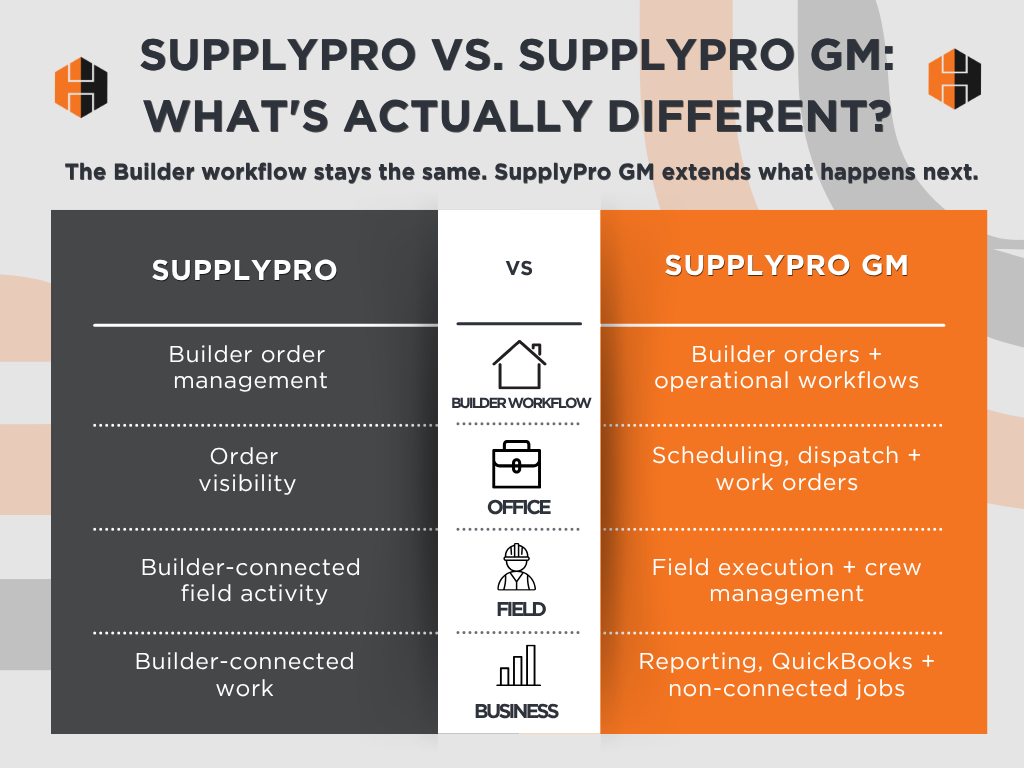
If you’re evaluating SupplyPro GM, the playbook provides a deeper look at how it extends the workflows many Suppliers and Contractors already use every day.
Download the SupplyPro GM Playbook
One Thing SupplyPro Can’t Do: Non-Connected Jobs and Customers
One of the biggest differences between SupplyPro and SupplyPro GM involves work that does not originate from a Builder-issued order.
For many Suppliers and Contractors, Builder work represents only part of the business. Service calls, warranty requests, retail customers, commercial projects, property management work, and internal jobs are often just as important to day-to-day operations.
While these jobs may not come from a Builder-issued order, they still require scheduling, dispatching, crew assignments, work orders, field execution, and visibility.
SupplyPro was designed around Builder-connected workflows. SupplyPro GM extends beyond those boundaries by allowing users to manually create customers and jobs that are not connected to a Builder-issued order.
That means teams can manage both Builder-connected and non-connected work within the same operational environment instead of maintaining separate systems, spreadsheets, or disconnected processes for different parts of the business.
For many organizations, the ability to manage all types of work in one place becomes one of the most valuable differences between SupplyPro and SupplyPro GM. The operational impact becomes especially clear when Builder-issued orders, service work, retail projects, and other customer jobs all need to be managed by the same office team, field crews, and dispatchers.
Seeing Every Builder and Every Trade Order in One Place
Visibility is often one of the first challenges companies encounter as they grow.
Consider a Supplier working with multiple Builders across several communities. Throughout the day, the office team may need answers to questions such as:
- Which Builder orders were received today?
- What is the status of each trade partner order?
- Which jobs have already been scheduled?
- Which installations have been completed?
- Which work orders still require attention?
- Which crews are assigned to upcoming work?
Without centralized visibility, answering those questions often requires jumping between multiple systems, spreadsheets, reports, and conversations. SupplyPro GM helps bring that information together.
By combining Builder-connected activity, trade partner order status, scheduling, field execution, work orders, and reporting, teams gain a broader operational view across Builders, communities, customers, and crews. Instead of piecing together information from multiple sources, they can see how work is progressing across the business and identify issues before they become larger problems.
Bringing that information together gives teams a clearer understanding of where work stands, what needs attention and what should happen next.
What SupplyPro GM Users Say Changed First
One of the important differences with SupplyPro GM is greater visibility into what happens after the Builder order arrives. The familiar Builder-connected workflow remains, while teams gain a broader view of the jobs, schedules, work orders and field activity surrounding that order in one place.
That broader view can reduce the time office teams spend tracking down updates while giving managers a clearer picture of what is happening across Builders, customers, jobs and crews. Instead of piecing together information from spreadsheets, email chains, whiteboards and separate applications, teams have a more connected way to see and manage the work already underway.
Frequently Asked Questions
SupplyPro GM builds on the SupplyPro workflow that users already know today. SupplyPro continues to support Builder-connected workflows while SupplyPro GM extends visibility into scheduling, field execution, accounting, and reporting.
Do Builder orders still come through SupplyPro?
Builder-issued orders still arrive through the same SupplyPro workflow your team already uses today.
SupplyPro GM adds scheduling, dispatch, field execution, work-order management, QuickBooks Online integration, reporting, and support for non-connected customers and jobs.
SupplyPro GM allows users to manually create customers and jobs that are not connected to a Builder-issued order.
SupplyPro GM is designed for Suppliers and Contractors that want greater visibility into scheduling, field activity, accounting processes, reporting, service work, and day-to-day operations while continuing to leverage the Builder-connected workflows available through SupplyPro.
The Foundation Stays the Same. The Visibility Expands.
SupplyPro continues to provide the Builder-to-trade-partner connection that Suppliers and Contractors rely on every day.
SupplyPro GM builds on that foundation by extending visibility into scheduling, field execution, QuickBooks Online integration, reporting, and support for manually created customers and jobs. While the Builder-connected workflow remains familiar, teams gain a more complete view of the operational activities that happen after an order is received.
For organizations looking to connect office operations, field activity, accounting processes, and reporting within a single environment, SupplyPro GM provides a natural next step that builds on the workflows teams already know and trust.
Download the SupplyPro GM Playbook to see how SupplyPro GM fits into your existing workflow.
The playbook walks through the complete Builder → Office → Field → Accounting → Reporting workflow and provides a deeper look at how SupplyPro GM helps Suppliers and Contractors manage both Builder-connected and non-connected work.
Ready to take a closer look? Schedule a SupplyPro GM demo