How Builder-Supplier Workflows Actually Work and Where They Break Down

In residential construction, receiving a purchase order from a Builder is only the beginning of a much larger workflow. That order still has to move into the Supplier or Contractor’s day-to-day operations, where teams manage scheduling, field work, changes, completion, billing, and payment.
When each part of that process stays connected, information can move with the job from the Builder to the office, into the field, and back again. When those connections are missing, something as common as a schedule change or order update can create additional work across several teams and systems.
For Suppliers, Manufacturers, and Trades working with Builders, or considering expanding into the production Builder market, understanding how these handoffs work is important, especially as the number of Builder relationships, jobs, schedules, and crews continues to grow.
The Workflow Most People Don’t See
A Builder-Supplier workflow connects the order and schedule information created by the Builder with the operational work managed by the Supplier or Contractor. Once an order is received, that information may need to support scheduling, material or crew coordination, field activity, job completion, invoicing and payment.
Each stage depends on accurate information from the one before it. When those processes are managed in separate systems, even an electronically delivered order can lead to manual work as teams move information into scheduling, field operations and accounting. Construction vendor management software can help connect these parts of the workflow so information moves with the job rather than being repeatedly entered or updated across separate systems.
How a Job Release Actually Works on the Builder Side
On the Builder side, the process begins with the job, order, and schedule information that the Supplier or Contractor needs to manage the work.
Once that information reaches the Supplier or Contractor, it becomes part of a much larger process. The work needs to be scheduled and managed, and depending on the type of work being performed, materials and field resources may need to be coordinated as well.
This becomes especially important when the Builder’s information changes. Schedule and order changes need to make their way into the Supplier or Contractor’s operation so the teams responsible for managing and completing the work have current information. When the Builder’s information and internal processes are disconnected, those updates may have to be carried manually into scheduling, order management, or field processes.
What Happens When That Job Hits the Supplier or Trade
Once an order reaches the Supplier or Contractor, the focus shifts from receiving the work to managing and completing it. Office teams need to manage incoming orders, schedule and dispatch work, track job activity, and make sure field teams have the information they need.
Depending on the job, materials, inventory, and purchasing may also need to be coordinated. At the same time, field personnel need access to current job information so they know what needs to be completed and can document what happens on the job.
As work progresses, field teams may update job status, complete forms or checklists, capture photos, document issues, and record completion. That information then needs to make its way back to the office so teams can see where the job stands and move it into the next part of the workflow.
For Suppliers, this is where building supply software needs to extend beyond simply receiving an electronic order. The order may start the process, but scheduling, material coordination, field execution, job completion, billing and payment all depend on what happens after it is received. Keeping those activities connected helps teams manage the full workflow without relying on separate systems or manual updates at each stage.
Where It Breaks Down: The 4 Most Common Failure Points
Builder-Supplier workflows become harder to manage when information has to move manually between people, tools, and systems. Four common breakdowns can create problems as a job moves forward:
- Builder changes don’t reach the internal schedule.
Schedule or order changes can be missed when Builder information and internal scheduling are disconnected.
- Order and field information fall out of sync.
When orders and field work are managed in different systems, teams may have to manually move or re-enter job information. Changes to the original order can also create mismatches between the Builder’s PO and the information the Supplier or Contractor is using to manage the work.
- Field updates don’t make it back to the office.
When updates are spread across calls, texts, paper, or separate tools, office teams have less visibility into job progress and completion.
- Completion doesn’t flow directly into invoicing.
When field and accounting processes are disconnected, completed job information may need to be re-entered before invoicing can move forward.
Schedule Changes and the Cascade Effect
Consider a Contractor, such as a Plumbing or HVAC Contractor, that receives an order from a Builder and schedules the work based on the Builder’s current schedule. If the Builder later changes that schedule, the Contractor also needs to update its own scheduling system.
When those schedules are disconnected, someone has to identify the change and manually update the Contractor’s internal schedule and field team, turning one Builder change into several internal updates.
Connecting those schedules means fewer manual updates and helps office and field teams work from current information.
The Payment Bottleneck Nobody Talks About
Payment may happen at the end of the workflow, but delays can start earlier. Before a job can be invoiced, the work has to be completed and the right information needs to make it from the field to the office. When field completion and accounting are disconnected, teams may have to re-enter information or take additional steps before an invoice can be sent.
Depending on the Builder’s requirements, missing documentation or lien releases can create additional steps before payment can move forward, adding another potential delay to the payment cycle.
Those extra steps can create more time between completing the work, sending the invoice, and getting paid. Keeping those processes connected can make it easier to move a completed job through billing and payment.
What a Connected Builder-Supplier Workflow Looks Like
A connected workflow keeps Builder information tied to the operational work that follows. Instead of treating the order, schedule, field activity, completion and billing as separate processes, information can move with the job as it progresses.
In practice, that workflow may look like:
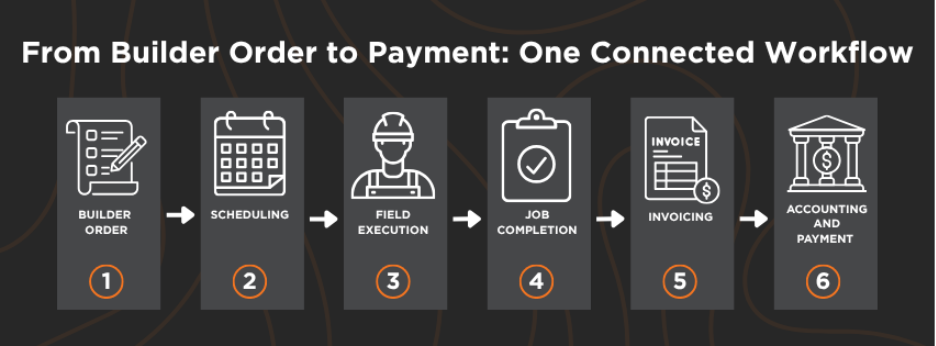
When a Builder makes a change, updated information can reach the teams responsible for managing the work. As field teams complete the job and document progress, that information can flow back to the office and support the next steps in invoicing and accounting.
As Suppliers and Contractors take on more jobs, crews and Builder relationships, maintaining those connections becomes increasingly important. Builder-Supplier integration can reduce the amount of information teams need to manually move between systems while giving office and field teams better visibility into where each job stands.
How SupplyPro GM Manages the Handoffs
SupplyPro GM connects the Builder side of the workflow with the work Suppliers, Manufacturers, and Trades manage every day. Builder orders and schedule information flow into SupplyPro GM, where teams can manage incoming changes, scheduling, field activity, and job completion without re-entering the same information across separate systems.
SupplyPro GM also connects with QuickBooks Online for accounting and Hyphen Wallet for ePayments, keeping more of the process connected from the initial Builder order through payment.
Frequently Asked Questions
A Builder-Supplier workflow connects the order and schedule information created by a Builder with the operational work managed by the Supplier or Contractor. That can include scheduling, field activity, job completion, invoicing, accounting and payment, with information moving between each stage as the job progresses.
Construction vendor management software helps connect the information and processes involved in managing work between Builders and their Suppliers or Contractors. Depending on the software, that can include orders, scheduling, field activity, job completion, invoicing and other operational workflows.
Builder-Supplier workflows often break down when information has to be manually moved between separate people, systems and processes. Schedule changes, field updates or job completion information can become disconnected, creating additional work and making it harder for teams to maintain current information.
Builder-Supplier integration can reduce manual handoffs by keeping Builder orders and schedule information connected to the Contractor’s operational workflow. This can give office and field teams better visibility into current job information while reducing the need to re-enter updates across multiple systems.
SupplyPro GM connects Builder orders and schedule information with the operational work Suppliers and Contractors manage afterward, including scheduling, field activity and job completion. Connections with QuickBooks Online and Hyphen Wallet can extend that workflow into accounting and ePayments.
Keep Your Builder Work Connected
See how SupplyPro GM connects Builder orders with scheduling, field work, billing, and ePayments.