How to Run Builder Orders and Non-Builder Jobs From the Same System

If you’re a building material Supplier, there’s a good chance your business runs on two different workflows. Builder orders flow through SupplyPro, while custom Builder jobs, remodel projects, retail deliveries, service work or commercial jobs may be managed somewhere else, whether that’s a spreadsheet, whiteboard, ERP or a combination of several systems.
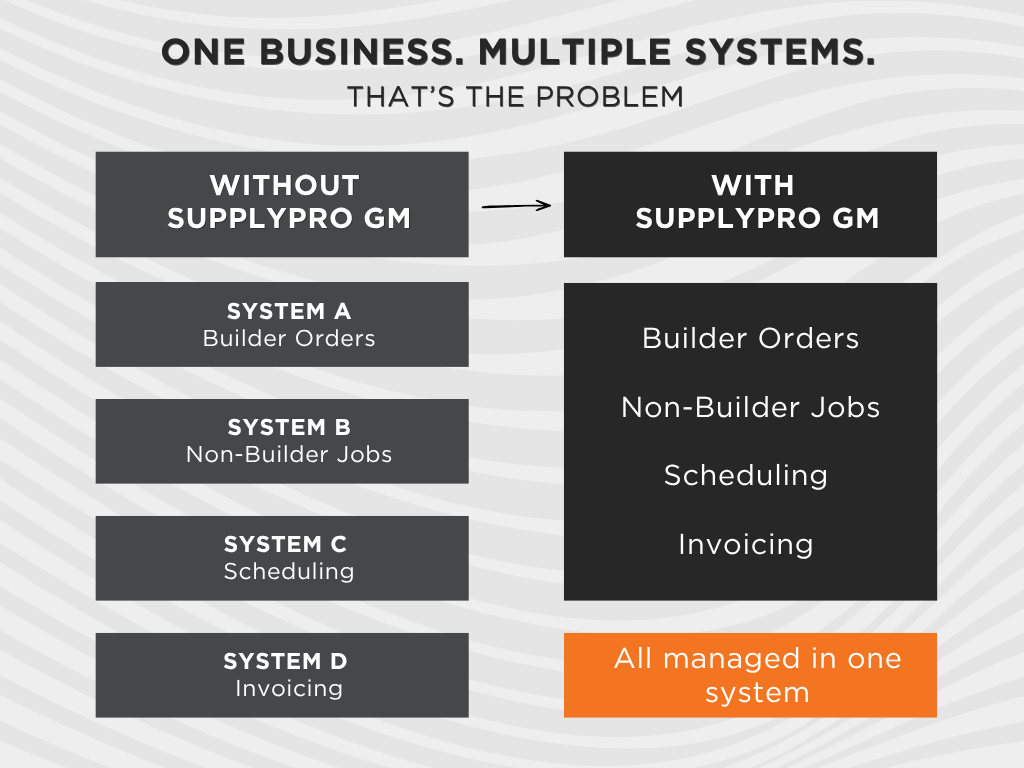
The same people, trucks, schedules and resources still have to support all of that work, which becomes much harder when teams are managing it from multiple places. Bringing those jobs together gives the business a clearer view of what’s happening across the entire operation.
Want to see how Suppliers are bringing Builder-connected and non-connected work together? Download the SupplyPro GM Playbook
The Two-System Problem Most Suppliers Live With
Consider a Monday morning at a building material supplier’s office.
A dispatcher schedules a lumber delivery for a national Builder community. Because the order originated within the Builder-connected workflow, everything is easy to find and manage.
A few minutes later, that same dispatcher needs to schedule a delivery for a custom Builder across town. The delivery requires the same truck, the same driver, and the same scheduling process, but the job information lives somewhere completely different.
Even though both deliveries are part of the same operation, they are often managed through separate systems.
This is a common reality for Suppliers. Builder-connected work lives in one workflow while custom Builder projects, remodel jobs, retail orders, service work, and other customer projects live somewhere else. Office teams constantly move between systems to coordinate schedules, answer questions, and make sure resources are being allocated correctly.
Over time, that fragmentation creates extra administrative work and makes it harder to maintain visibility across the entire business.
Why SupplyPro Only Sees Half Your Work
SupplyPro was designed to manage Builder-connected workflows.
In addition to supporting production Builders, many companies also work with custom Builders, remodelers, retail customers, property management companies, commercial projects, and service or warranty customers. These jobs still require scheduling, dispatching, delivery coordination, accounting, and reporting, but they do not originate from a Builder-connected order.
As a result, a significant portion of the business often exists outside the same workflow used for Builder work. Teams may have visibility into one side of the operation but lack a complete picture of everything happening across the organization.
For a broader look at how Builder-connected orders move between Builders and Suppliers before they reach your operation, read How Builder-Supplier Workflows Actually Work.
One Schedule, One Truck, Two Kinds of Jobs
For building material Suppliers evaluating job management software, coordinating Builder-connected and non-connected work often comes down to managing the same trucks, crews, schedules and resources across different types of jobs. Drivers, dispatchers and field teams need accurate information about where they’re going, what they’re delivering and when the work needs to happen, regardless of where the order originated.
If a truck is delivering materials to a Builder community at 8:00 a.m. and making a delivery to a remodel contractor at 10:00 a.m., both jobs affect scheduling, labor utilization, delivery capacity, and customer expectations. From an operational perspective, they belong on the same schedule.
When Builder work and non-Builder work are managed separately, dispatchers often find themselves comparing multiple systems to understand availability, plan routes, and coordinate resources. Decisions take longer because critical information is scattered.
Bringing both types of work into the same scheduling environment gives dispatchers a more complete operational picture. From the truck’s perspective, it doesn’t matter whether a delivery originated through a Builder-connected workflow or was added manually. What matters is knowing every job competing for the same truck, driver and time slot before the schedule is set.
Learn how Suppliers are managing Builder-connected and non-connected work from a centralized workflow.
Download the SupplyPro GM Playbook
Adding Customers, Jobs, and Orders Manually in SupplyPro GM
One of the most significant differences between SupplyPro and SupplyPro GM is the ability to manually create customers, jobs, and orders.
With SupplyPro GM, work does not have to originate from a Builder-connected workflow to be managed within the system. Teams can create and manage custom Builder projects, remodel jobs, retail customer orders, service requests, warranty work, commercial projects, and other customer activity directly within the platform. That means Builder-connected and non-connected work can sit side by side in the same operational environment, giving teams one place to manage a broader range of jobs. The ability to manage manually created customers, jobs, and orders is also one of the biggest distinctions between SupplyPro and SupplyPro GM.
What Stays Automatic: Your Builder-Connected Work Doesn’t Change
One of the first questions many Suppliers ask is whether managing non-connected jobs affects the Builder workflow they already rely on. The answer is no.
Builder-connected orders continue to flow automatically from BuildPro and BuilderGM through the same workflow many teams already use today. The Builder side of the process remains familiar, and the connection between Builders and Suppliers remains intact. SupplyPro GM simply expands what can be managed alongside that Builder-connected work.
Teams gain the ability to manually create customers, jobs, and orders while continuing to receive Builder-issued work through the same connected process. Adding non-connected work does not disrupt the workflows that already support Builder relationships.
The Field App and QuickBooks Don’t Care Where the Job Came From
Once the job reaches the field, where it originated matters much less than having the information needed to complete it. A driver making a delivery to a production Builder needs the same kind of scheduling and job information as a driver heading to a custom Builder or remodel project. The office still needs to know where the truck is going, the field needs current job information, and accounting needs accurate data when the work is complete.
SupplyPro GM allows Builder-connected and non-connected work to move through the same scheduling, field execution and accounting processes, helping teams manage a broader mix of work without creating separate workflows for every customer type.
That includes QuickBooks Online integration, which helps connect operational activities with accounting processes and reduces the need to maintain information across multiple systems.
Seeing Your Whole Business in One Report
Bringing Builder-connected and non-connected work together also changes what teams can see in their reporting. When Builder work lives in one system and everything else lives somewhere else, each report tells only part of the story.
With both types of work in the same operational environment, leadership can look across upcoming jobs, crew activity, delivery schedules, workload distribution, service activity and customer demand without first piecing together information from separate sources. That provides a more complete picture of how resources are being used across the business and where additional attention may be needed. Bringing Builder-connected and non-connected work together also creates a stronger foundation for understanding profitability across customers, jobs and Builders.
Frequently Asked Questions
SupplyPro GM allows users to manually create customers, jobs, and orders that are not connected to a Builder-issued order.
Builder-connected work continues to flow automatically from BuildPro and BuilderGM through the same connected workflow many Suppliers already use today.
SupplyPro GM allows Builder-connected and non-Builder work to be managed within the same scheduling environment, providing greater visibility into workloads, resources, and upcoming activity.
SupplyPro GM includes QuickBooks Online integration, allowing accounting processes to remain connected to operational activity.
SupplyPro GM is designed for Suppliers and Contractors that want to manage Builder-connected work alongside custom Builder projects, remodel jobs, retail orders, service requests, warranty work, and other non-connected business from a centralized system.
Bringing the Two Sides of the Business Together
For many Suppliers, Builder-connected orders are only one part of the work they manage every day. Custom Builder projects, remodel jobs, retail orders, service work and other customer activity still compete for the same people, trucks and schedules.
SupplyPro GM brings those two sides of the business together, allowing Builder-connected work and manually created customers, jobs and orders to be managed within the same operational environment while the familiar Builder workflow remains intact.
Download the SupplyPro GM Playbook to see how Suppliers are bringing Builder and non-Builder work together in one system.
The playbook provides a deeper look at how SupplyPro GM connects scheduling, field operations, accounting, and reporting while supporting both Builder-connected and non-connected work.
Ready to take a closer look? Schedule a SupplyPro GM demo